Table of contents
We always meet (W17 105):
Tuesday: 9:00-13:00
Wednesday: 9:00-13:00
Thursdays: 9:00-13:00
| Week 1 | Class1 Date: 6/26 |
Class2 Date:6/27 |
Class3 Date:6/28 |
| Week 2 | Class4 Date:7/3 |
Class5 Date:7/4 |
Class6 Date:7/5 |
| Week 3 | Class7 Date:7/10 |
Class8 Date:7/11 |
Class9 Date:7/12 |
| Week 4 | Class10 Date:7/17 |
Class11 Date: 7/18 |
Class12 Date: 7/19 |
| Week 5 | Class13 Date: 7/24 |
Class14 Date: 7/25 |
Class15 Date: 7/26 |
Class Schedule
Classes are subject to change based on the interests of class and direction in which class proceeds. Please make yourself aware of all changes to the schedule.
If you miss a class, it is your responsibility to learn of any changes.
Week 1
Theme of the week: HTML + CSS
Class 1) Introduction: HTML + CSS – Tutorial 1
Class 2) Task 1: HTML + CSS – Hello World (individual)
Class 3) Presentation: HTML + CSS – Hello World (individual)
Week 2
Theme of the week: Navigation & Site mapping
Class 4) Introduction: net.art & art on the net (Exercise A: site mapping)
Class 5) Task 2a: Journey – site mapping (group)
Class 6) Presentation: task 2a Journey – site map (feedback +changes)
Week 3
Theme of the week: UX & Wireframes
Class 7) Introduction: UI, UX & Wireframes (Exercise B: wire frames)
Class 8) Responsive Design, Sketching and mockups (Task 3: Pitch a project)
Class 9) Task 2: Journey – create
Week 4
Theme of the week: Communicating ideas & WordPress
Class 10) Presentation: Journey – webpage (Task2:PartB)
Class 11) Introduction to WordPress – Tutorial 2 (Presentation: Pitch a project)
Class 12) Task 4: Portfolio
Week 5
Theme of the week: WordPress & Content Production
Class 13) Consulting on Portfolio & Task 5: Photo Safari
Class 14) Embedding Media & Task 6: About me video
Class 15) Presentation WordPress Portfolio
Class 1 – Introduction: HTML + CSS
Content:
- Information about the class
- Introduction to Web Design
- Introduction to theme of the week: HTML + CSS
- Tutorial 1a – Introduction: HTML
Links:
- www.webdesignmuseum.org
- www.w3schools.com
- Fonts
- Colors
Presentation:
Class 2 – HTML + CSS – Hello World
Content:
- Tutorial 1b – Introduction: CSS
- Wrap up of what we learned
- Task 1) Hello World
HTML
Within: <body></body>
Tag
<tagname></tagname>
for example : <h1></h1>
Attribute
<tagname attribute=”value”>
for example : <img src=”image.jpg”>
CSS
Within: <head><style></style></head>
tag{
property:value;
}
for example:
body {
background-color: SeaShell;
}
Task 1) Hello World (Individual Task, 10%):
- Create a introduction page of yourself similar to the one made in Tutorial1
- Should at least contain (minimum):
- 3 headings <h1><h2><h3>
- paragraphs <p>
- links <a>
- 1 image <img>
- inline or internal CSS styles (color, font-family, font-size, background-color etc.)
- list <ul> or <ol>
- The webpages should be about you for example: name, interests, hobbies, what you like/dislike, family, travel experiences, how you live, about your home time etc. you choose.
- Create the webpage in text edit(mac) or note pad(pc) and save as:
- studentID_name.html (e.g. 20171474_lindakronman.html)
- Use: https://www.w3schools.com/ (also in Korean and Chines) and HTML and CSS cheat-sheets that were handed out in class for help
- To get graded for task you need to fulfill the minimum requirements, extra points are given for using more HTML and CSS, content and design.
Links:
Class 3 – Presentation: HTML + CSS – Hello World
Content:
- Finish working on Task 1) Hello World
- Handing in Task 1) Hello World (deadline 10:30)
- Presentation and Feedback on Task 1) Hello World
- Chance to correct bugs in code
- Wrap up what did we learn this week
How to hand in Task 1) Hello World:
- Name your html file: studentID_name.html
- Upload your file here
- If you use images that are not online upload the images as well
- Check with me that your files were uploaded
- Ask for help if something is not clear
Class 4 – Introduction: net.art & art on the net
Content:
- Introduction to the theme of the week: Navigation & Site mapping
- Introduction to electronic literature and net.art
- Exercise A: site mapping
Exercise A) Site Mapping (Group task, 5%)
Groups of 2-4 persons
Use paper and pen to create a site map for the website you are assigned (examples in presentation slides).
Handed in: Today 1pm
Group 1: https://www.amnesty.org/
Group 2: http://www.greenpeace.org/eastasia/
Group 3: https://www.worldvision.org/
Group 4: https://plan-international.org/
Group 5: https://en.unesco.org/
Links:
- Collections:
- Examples:
- More links to examples in the presentation slides below
Presentation:
Photo:
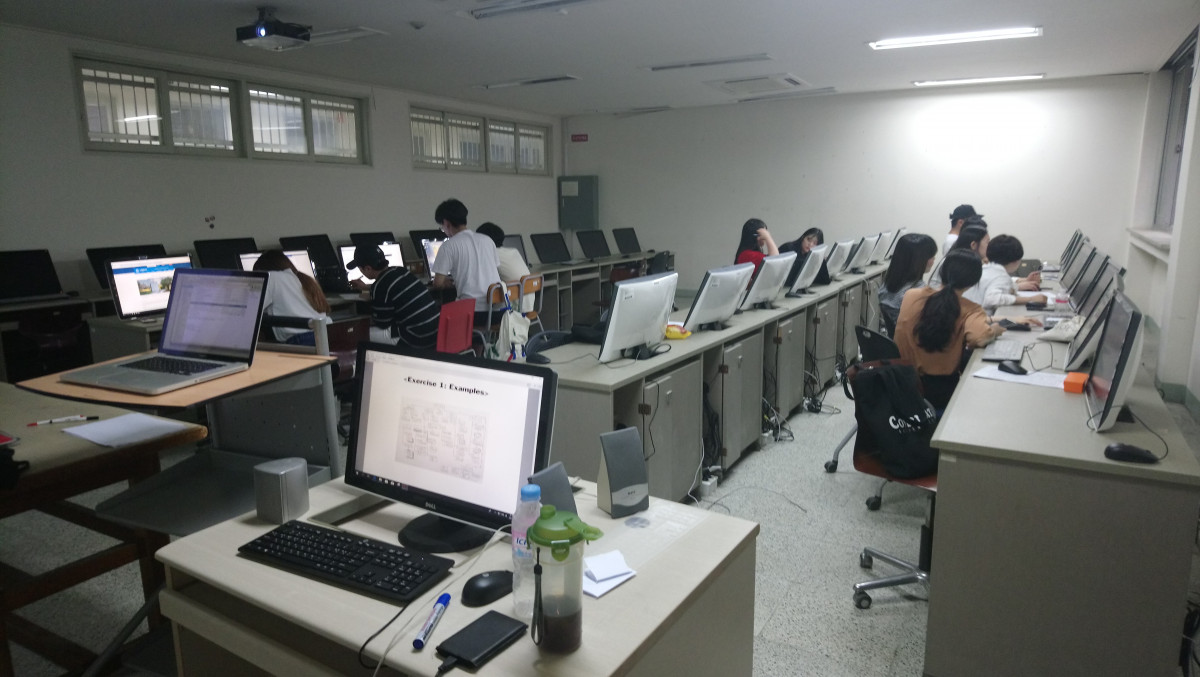
Class 5 – Journey – site mapping
Content:
- Introduction to Task 2) Journey (group work)
- Time to work on Task 2 part a) Journey – site mapping
Task 2) Journey (Group Task 10%):
Create a hypertext story by linking 15-30 simple webpages with text and images (gif-animations) to create a story that the user can follow.
The theme of the story should be Journey:
Something suggesting travel or passage from one place to another:
- moving from place A to B
- traveling
- the journey from youth to maturity
- a journey through time
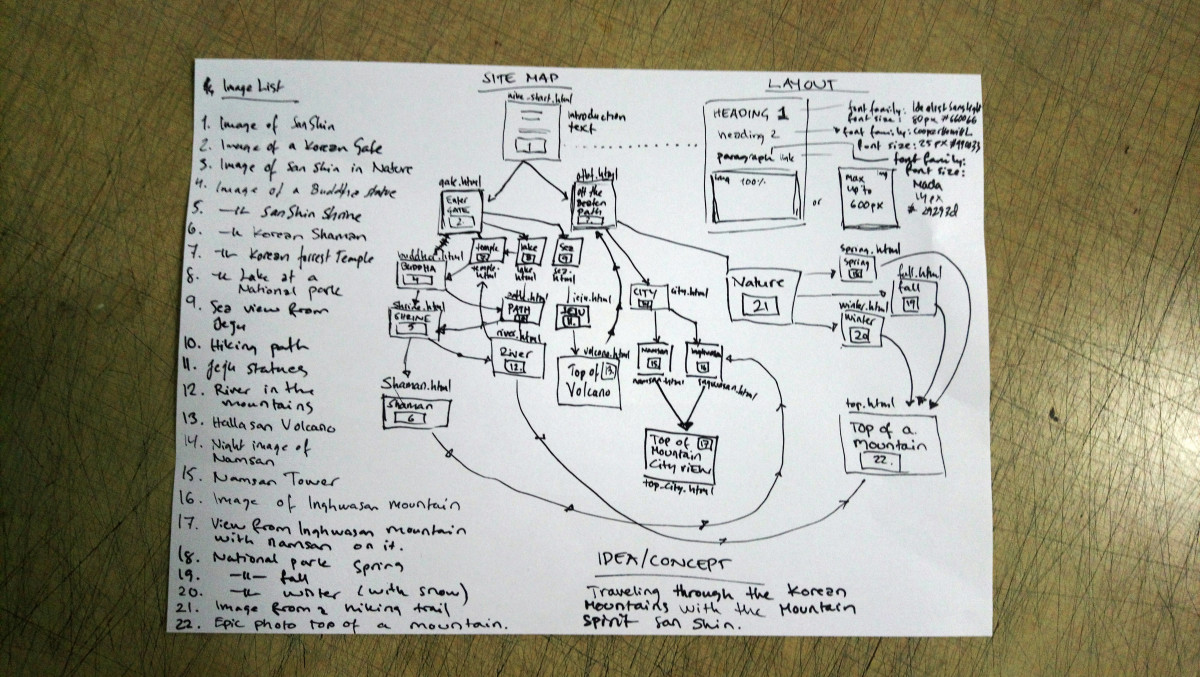
Part A:
- First come up with a concept/idea what kind of journey story you want to create.
- Create a site map for the project (class 5&6)
- Hand drawn or digital
- Include notes on what each page contains (describe text & images)
- Media list: images/videos/gifs
- Description of main layout elements (headings, paragraphs, links etc.)
Hand in date: 2018/7/5
Example:
Part B: Create the website (class 8&9)
Hand in date: 2018/7/12
Class notes:
- Groups
- 1: Kim Min Ji, Jang Hyun Seo, Hwang Hyun Ji
- 2: An Byungchan, Choi Seok Hyun
- 3: Um Yu Kyeong, Park Jang Mi
- 4: Zhang Ruiting, Xie geng chen
- 5: Jang Jeong Yoon, Lee Si Hoon, Kim Keun Young
- Ideas/Concepts
- Group1: Sea life, Treasure hunt
- Group2: Travel from Daejeon to Busan
- Group3: Traveling through the Korean food culture
- Group4: What remains of Edith Finch (a own version inspired by the tale http://edithfinch.com/)
- Group5: Tourist in LA
Presentation:
Class 6: Presentation: Journey – site map
Content:
- Presentation & Feedback on group work Task 2 part a) Journey – site mapping
- Time for working on changes based of feedback Task 2 part a) Journey – site mapping
Class 7 – Introduction: UI, UX & Wireframes
Content:
- Introduction: UI, UX & Wireframes
- Exercise B: wire frames
Exercise B:
- Group exercise (5%)
- Same groups as in exercise 1
- Use paper and pen to create wireframes
- Choose 2 pages from the same website as in exercise 1
and draw wireframes of them- Group 1: https://www.amnesty.org/
- Group 2: http://www.greenpeace.org/eastasia/
- Group 3: https://www.worldvision.org/
- Group 4: https://plan-international.org/
- Group 5: https://en.unesco.org/
Presentation:
Class 8 – Responsive Design, Sketching and mockups (Task 3: Pitch a project)
Content:
- Responsive Design – Tutorial 2
- Task 3: Pitch a project (group – Journey Planning II)
Task 3) Pitch a project (Group Task 10%):
- A concept presentation of your Journey project
- Finalize your notes, sitemap, sketches, content lists from earlier classes
- Create wireframes for your page layouts
- Create mockups for your layout in PhotoShop (typography, colors etc.)
- A styles list with defined (font, color, size etc.) Heading 1,Heading 2…, paragraphs, links and other elements.
- Collect everything in a presentation in pdf format (Example here)
- Hand in by the end of the day by e-mailing the pdf to lindakronman@wsu.ac.kr
Links:
- Responsive Tutorial:
https://www.w3schools.com/html/html_responsive.asp
(repeats a lot of what we did today) - Bootstrap Tutorial:
https://www.w3schools.com/bootstrap4/default.asp - Extra Image Maps: : https://www.w3schools.com/tags/tag_map.asp
Presentation:
Class 9 – Journey – create
Content:
- Present Task 3 (counseling with feedback and discussion)
- Work on building the HTML version of the Journey (Task 2: Part B)
Class 10 – Journey presentation
Content:
- Finish Journey (Task 2: Part B)
Class 11 – Introduction to WordPress
Content:
- Presentation – groups try out each others stories
- Hand in Journey (Task 2: Part B), final corrections based on presentation feedback (user tests)
- Introduction to WordPress – Tutorial 3
Presentation:
- Each group sets up their website working on one computer in the classroom
- Divide your group to testers & observers
- Testers go to all of the other groups and writes constructive comments (english) in their project log.
- Observers stay at their project and observes how the others are using their website. Record observations in the project log.
- We will rotate between the projects in 10 min intervals.
Links:
Task until tomorrow:
- Create a WordPress account
- E-mail link to your website to me: lindakronman@wsu.ac.kr
Photos:
Class 12 – WordPress portfolio
Content:
- WordPress – Tutorial 3 (customize, pages, posts, portfolio etc.)
- Task 4: Portfolio (individual)
Task 4: Portfolio (individual) 20%
- Create a portfolio in WordPress
- About me (task 6)
- Portfolio: show some of your works (minimum 3)
- Blog posts (task 5)
- Today choose template and work on setting the framework
- Deadline for the whole task is before class 15 (7/26) when we have the presentation
Class 13 – Content Production
Content:
- Introduction to week theme: WordPress & Content Production
- WordPress app
- Introduction to tasks Task 5: Photo Safari, Task 6: About me video
- Individual counseling on WordPress protfolio
- Work on tasks 5&6
Task 5) Photo Safari
- Make photos on your phone and upload them as blog posts with the WordPress app to your website
- Photo Safari tasks:
- Post1: Happy/Sad (2 images)
- Post2: 4 elements – earth, air, water, fire (4 images – gallery)
- Post3: Trash (1 image)
- Post4: Fashion (1 image or more)
- Post5: Me and my friends (1 image)
- Post can be in any order, all posts should be done.
- Tag the posts photosafari and in the title or in the text field of the post write which Photo Safari task it is.
- Deadline: before the presentations in class 15 (7/26)
Task 6) About Me
- Make a video that describes you
- length 30 sec – 2 min
- Can be you talking, can be just filming stuff you like, can be a mashup of videos.
- Upload it on Youtube or Vimeo or another video streaming platform that allows you to embed the video as a iframe link.
- Embed the video on your About Me page on your webpage (Class 14: Tutorial on Embedding Video into WordPress )
Class 14 – Embedding Media
Content:
- How to embed media into WordPress
- Work on task 5 & 6 and embed them into your WordPress blog
How to embed videos in WordPress
Version 1
- Upload your video on YouTube or Vimeo.
- Find the video you wish to embed on YouTube YouTube or Vimeo.
- Click the Share link (under the video)
- Under ‘Share this video‘ choose Embed Video, copy the video address to the clipboard (click the ‘COPY’ button).
- Log into your WordPress Admin panel and edit the post or page you wish to add your video to (in Text Formatting style).
Version 2
- Upload your video on YouTube or Vimeo.
- Find the video you wish to embed on YouTube YouTube or Vimeo.
- Click the Share link (under the video)
- Under ‘Share this video‘, copy the video address to the clipboard (click the ‘COPY’ button).
- Log into your WordPress Admin panel and edit the post or page you wish to add your video to.
- Choose Add Media > Insert from Url and add your video link there.
Video Tutorials:
Class 15 – Presentations
Content:
- Last minute help clinic to get rid of bugs or to upload material (until 10:00)
- WordPress portfolio presentations (individual)
- Evaluation
Presentations:
Each student showcases their wordpress site and explains a bit about the choice of the theme and the content (pages, portfolio, blog posts, video).
Jang Hyun Seo: https://826dot.wordpress.com/
Kim Min Ji: https://kmj136170367.wordpress.com/
Jang Jeong Yonn: https://mystuff980009382.wordpress.com/
Kim Keun Young: https://mystuff20090819.wordpress.com/
XIEGENG CHEN: https://lolqqcom.wordpress.com/
ZHANG RUITING: https://treasure201612134.wordpress.com/
Choi Seok Hyun: https://hyun826041628.wordpress.com/
An Byung Chan: https://bangeverywhere.wordpress.com
Kim Min Young: https://minyoung627960005.wordpress.com
Um Yu Kyeong: https://umdbrud.wordpress.com
Park Jung Mi: https://jaaangmi.wordpress.com
Hwang Hyun Ji: https://hyunjidotcom.wordpress.com/
Si Hoon Lee: https://sihoon815337697.wordpress.com
Evaluation:
Follow this link to write an evaluation
Course Information
Please also note the  Policy document.
Instructor
Prof. Dr. Linda Kronman
Course Description
Web Design introduces students to the basics of hand-coding HTML and CSS. During the class students learn techniques such as wireframing, site mapping and mockups, that are professionally used methods to communicate ideas during a design processes of complex websites. The skills learned in class will be used in creative assignments. Through tutorials in class and hands-on assignments students will get familiar of the key principals of Internet and Web-design. We will seek inspiration from net.art and interactive data visualizations to understand concepts of interactivity, usability and navigation.
Parts of this course has been inspired by amazing course designs done by Victoria Bradbury
Prerequisites
- The students will be required to participate actively in creative thinking exercises.
- A willingness to be creative and participate in hands on assignments.
- While this is a basic course in web design students do not need any prior skills in coding or used software.
Learning Objectives
- Develop an understanding of art and design in the context of web-based interactive media.
- Knowledge about techniques and tools used to create web designs.
- Design, plan, and create websites
Course Requirements
- Desktop/Laptop with a browser.
- Email account.
- Flash drive(s) (USB sticks) to save assignments.
- Sketchbook or Notebook for notes, site maps, sketches.
- Pens, pencils, ruler.
Policies
General Course Policies
Please note that printer malfunctions, slow Internet connections, lost files, turnitin-timeouts, accidental deletions, and the like do not constitute adequate excuses for failing to submit assignments on time. It is your responsibility and your choice to avoid doing things at the very last moment.
Grading
- Project 20%
Wordpress Portfolio project overall execution - Assignments 40%:
Task 1: Hello World (HTML + CSS) 10%
Task 2: Journey 10%
Task 3: Pitch a project 10%
Task 4: Portfolio (see project)
Task 5: Photo Safari 5%
Task 6: Embedded about me video 5% - Participation 20% :
Exercise A: Site Mapping 5%
Exercise B: Wire Frames 5%
Presentations in class
Task1: 2%
Task2: 2%
Task3: 2%
Wordpress portfolio:4% - Attendance: 20 %
Students absent for more than one-third (33%) of the total class time, regardless of the reasons, may receive an “F” and be required to repeat the course.
Grades – Definition:
The following definitions will be used as a guide for the assignment of undergraduate grades.
A |
Mastery of course content at the highest level of attainment that can reasonably be expected of students at a given stage of development.
The A grade states clearly that the students have shown such outstanding promise in the aspect of the discipline under study that he/she may be strongly encouraged to continue. |
B |
Strong performance demonstrating a high level of attainment for a student at a given stage of development.
The B grade states that the student has shown solid promise in the aspect of the discipline under study. |
C |
A totally acceptable performance demonstrating an adequate level of attainment for a student at a given stage of development.
The C grade states that, while not yet showing unusual promise, the student may continue to study in the discipline with reasonable hope of intellectual development. |
D |
A marginal performance in the required exercises demonstrating a minimal passing level of attainment.
A student has given no evidence of prospective growth in the discipline; an accumulation of D grades should be taken to mean that the student would be well advised not to continue in the academic field. |
F |
For whatever reason, an unacceptable performance. The F grade indicates that the student’s performance in the required exercises has revealed almost no understanding of the course content.
A grade of F should warrant an advisor’s questioning whether the student may suitably register for further study in the discipline before remedial work is undertaken. |
Academic Dishonesty
Academic integrity is an essential part of our institutional mission. Any student found responsible for cheating, plagiarizing or in any other way compromising academic integrity may be subject to both academic disciplinary action (including dismissal from class) and student conduct review action (up to and including dismissal from the College/University).
Cheating includes the following cases:
- Signing-in students other than yourself;
- Copying another student’s homework or other written material;
- Plagiarizing or copying from the internet, reference books or articles without properly crediting the author and source;
- Referring to notes or texts, looking at answers of other students, or talking with other students during in-class examinations.
Attendance
- Students are expected to keep a perfect attendance record. To be truly present in class you must not only arrive on time, but you must remain engaged!
- You are expected to attend every class and be on time to receive full credit for attendance. The attendance is done through the attend.wsu.ac.kr platform.
- If you have problems signing in, please let me know at the beginning of each class (or in the first break).
- I cannot change attendance records once the class is done!
- Points will be deducted for each absence, regardless of the reason.
There are NO “excused absences” except the following cases as specified in the University policy:
- Funeral for immediate family (including grandparents) or parents of the spouse.
- Hospitalization due to illness or treatment caused of national epidemic.
- Outpatient treatment for sickness.
- Marriage of the student.
- Pre-health examination prior to military service call.
- Training for reserved armed forces.
- Calls for national duties or governmental request for participation for national events.
- University events approved by the President of Woosong University.
- Employment during school year
- Situations approved by the President of Woosong University aside from item 1 or item 9 listed above
Proper documentation together with completed form of Application for Legitimate Absence must be provided and approved for absences. Required documents and the completed form must be submitted to Department Office.
Students absent for more than one-third (33%) of the total class time, regardless of the reasons, will receive an “F” and be required to repeat the course.
Missed or Late Work
- Entry-level courses: Zero-tolerance late policy; late work will not be accepted in the entry-level courses, except in documented cases of hospitalization or other medical reasons – NO EXCEPTIONS, FOR ANY REASON. In other words, please do not ask me to accept late work unless you have in hand a doctor’s note or an email from the Student Health Center.
- Mid- and Expert-level courses: Late work will be penalized by a whole letter grade for every day the assignment is late.
If you know you will be participating in excused extracurricular events (athletics, field trips, etc.), then you must complete and submit your work BEFORE the deadline. If you need more time to complete an assignment, you must request an extension in writing (via email) at least 48 hours before the due date. With advance notice and an explanation, your extension will more than likely be granted.
